








Remote monitoring and management (RMM) software is an IT management solution that enables MSPs to monitor, manage, and maintain client IT environments remotely. These platforms provide visibility into device health and performance, help teams identify and proactively address issues, and streamline day-to-day IT operations.
Atera is our top RMM software pick for MSPs in 2026 because of its combination of remote monitoring, patch management, automation, remote access, and transparent per-technician pricing. NinjaOne is our choice for ease of use; Pulseway for mobile RMM; Datto for data protection; and ConnectWise for integrated security. The best choice for your MSP ultimately depends on the number of technicians, endpoint volume, automation requirements, security needs, and preferred pricing model.
- Top RMM software comparison
- Top RMM software comparison
- Atera: Best overall RMM software
- NinjaOne: Best for ease of use
- Pulseway: Best for RMM via mobile
- Datto: Best for data protection
- ConnectWise: Best for integrated security
- RMM vs. PSA: What’s the difference?
- Key feature to look for in RMM software
- Bottom line: choosing the best RMM software in 2026
- How we evaluated the best RMM software
- Frequently asked questions
Top RMM software comparison
Top RMM software comparison
| RMM software | Best for | Key strengths | Pricing model | Starting price |
|---|---|---|---|---|
| Atera | Best overall | Automation, patching, remote access | Per technician | $129/technician/month annually |
| NinjaOne | Ease of use | Automation, patching, cross-platform management | Per device | Sample pricing starts at $3.75/device/month at 50 or fewer endpoints |
| Pulseway | Mobile RMM | Mobile management, real-time alerts, automation | Per device | Contact for quote |
| Datto RMM | Data protection | Monitoring, patching, ransomware detection | Custom | Contact for quote |
| ConnectWise RMM | Integrated security | Security integrations, automation, intelligent monitoring | Custom/package-based | Contact for quote |
Atera: Best overall RMM software

Overall rating: 4.6/5
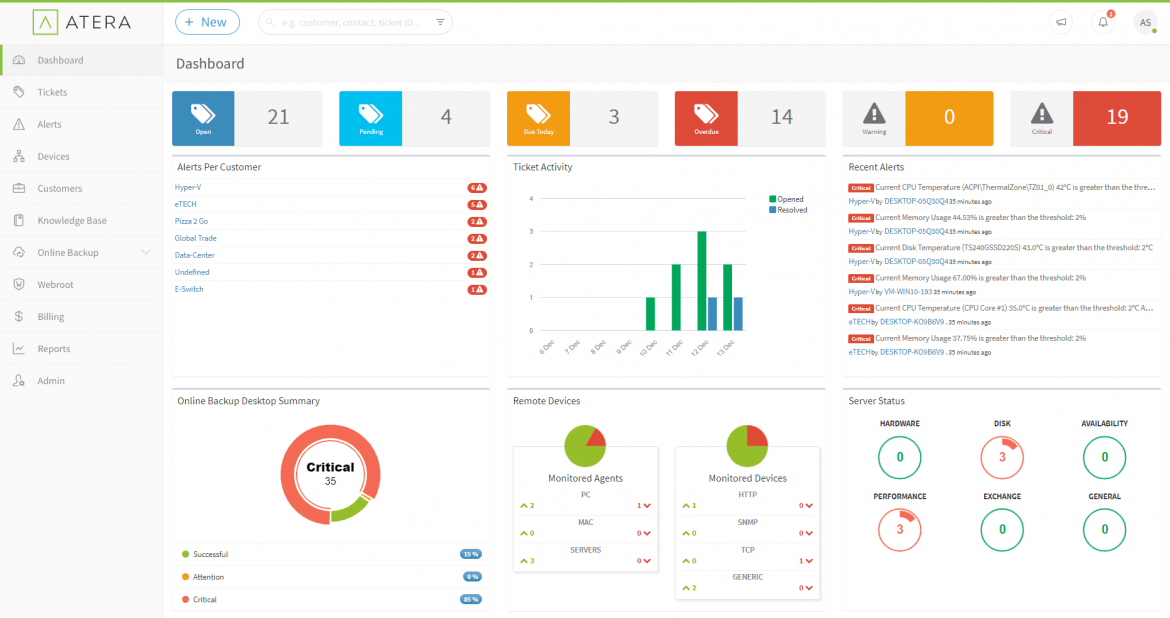
Atera, our top-rated overall RMM software, is an all-in-one cloud-based solution that delivers visibility and control over your MSP’s IT management. The platform offers a range of tools, including remote access, patch management, and IT automation, all within an intuitive interface.
Atera’s pricing is also transparent and competitive. It also offers backup and recovery features, though they are only available to subscribers of its two highest pricing tiers.
Although Atera is the top RMM pick, its integration options aren’t the most extensive.
Atera Features
- Remote access and support: Access and manage devices remotely.
- Patch management: Automate patch updates.
- IT automation: Set rules and streamline repetitive tasks and processes.
- Reporting: Get insights into IT infrastructure health and performance.
Atera Pricing
- IT department pricing: Starts at $149 per technician per month when billed annually.
- MSP pricing: Starts at $129 per technician per month when billed annually.
- Free Trial: 30 days.
Atera pros and cons
| Pros | Cons |
|---|---|
| Transparent pricing | Few integrations |
| Easy to use | Limited mobile app functionality |
| Robust remote access | UI could be more intuitive |
NinjaOne: Best for ease of use
Overall rating: 4.3/5
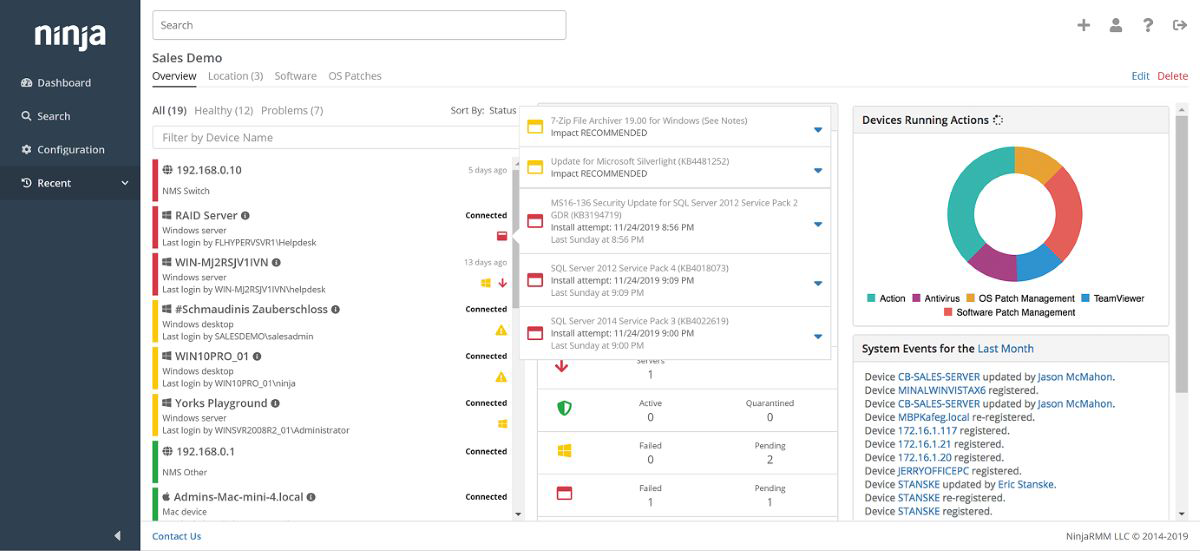
NinjaOne is intuitive RMM software that manages client endpoints at scale with a standout user-friendly interface, making it popular among MSPs that prioritize ease of use. It has a single interface that centralizes actions and unifies device management.
Since it’s easy to navigate, NinjaOne is quick to set up with a straightforward onboarding process. Its automation features, like automated patching, automated tasks, and auto-remediation, make it even more intuitive.
While NinjaOne has great automation features, you do have to contact them for a custom pricing quote.
NinjaOne Features
- Auto-remediation: Automatically detect endpoint issues and trigger remediation workflows to resolve common problems.
- Device actions: Run scripts, install applications, manage services, apply patches, and perform other device-level actions from the NinjaOne console.
- Cross-platform management: Monitor, automate, patch, and remotely support Windows, macOS, and Linux endpoints from a centralized platform.
- Patch management: Automate operating system and application patching to identify missing updates and keep managed endpoints up to date.
NinjaOne Pricing
- Contact for quote: Pay-per-device pricing available.
- Published sample pricing: $1.50/device/month at 10,000 endpoints; $3.75/device/month at 50 or fewer endpoints.
- Free trial: Contact for length.
NinjaOne pros and cons
| Pros | Cons |
|---|---|
| User-friendly design | No public pricing information |
| Robust automation features | Limited customization |
| Quick setup | Basic reporting system |
Pulseway: Best for RMM via mobile
Overall rating: 4.2/5
Overall rating: 4.2/5
Pulseway is RMM software that stands out in the market with its mobile-first approach, allowing MSPs to manage and monitor IT systems from their mobile devices.
This real-time monitoring tool sends customizable alerts directly to your phone, keeping you on top of things. It also allows you to auto-remediate issues, so you don’t have to find a computer to handle IT issues.
Pulseway also offers easy deployment features to get up and running quickly.
However, though clearly outlined, its additional costs can make the product expensive.
Pulseway Features
- Mobile RMM: Manage and monitor IT systems directly from a mobile device.
- Real-time alerts: Get instant notifications about system and endpoint issues.
- Pulseway automation workflows: Execute automated tasks from your phone.
- Discovery and deployment: See all your IT endpoints and mass-deploy Pulseway.

Pulseway Pricing
- Per-device pricing: Contact for price quotation.
- Free trial: Contact for length
Pulseway pros and cons
| Pros | Cons |
|---|---|
| Quality mobile app | Customer support could improve |
| Real-time alerting | Only basic security training |
| Easy to deploy | Has additional costs |
Datto: Best for data protection
Overall rating: 4/5
Datto is a cloud-based RMM platform that prioritizes data protection through a blend of flexible patch management, monitoring, ransomware detection, and rapid remote access and support.
Datto provides reliable backups, ensuring that MSPs never lose crucial data.
Its cloud-based nature makes it flexible and scalable, as there’s no hardware to maintain, making it suitable for MSPs of all sizes. Datto also has monthly feature releases and offers 24/7 consultation and assistance.
Although Datto’s UI is feature-rich, it is not intuitive to set up. So keep this in mind if you’re looking for a quick, plug-and-play RMM solution.
Datto Features
- Data protection: Use tools such as ransomware detection to protect critical data.
- Cloud-based platform: Manage your infrastructure with no hardware requirement.
- Remote monitoring: Monitor all your devices from a centralized dashboard.
- Flexible patch management: Keep software secure with automated updates.

Datto Pricing
- Contact for quote: Customizable pricing plans available.
- Free trial: 14 days.
Datto pros and cons
| Pros | Cons |
|---|---|
| Integration with Datto BCDR | Unintuitive UI setup |
| Good customer support | Not the easiest to use |
| Cloud-based solution | No upfront pricing |
ConnectWise: Best for integrated security

Overall rating: 4/5
ConnectWise is an IT management technology that offers an RMM platform with a variety of integrated security features and out-of-the-box remote management automations for alerts.
It also provides data protection and restoration capabilities, script automation, data insights, plus an exhaustive approach to cybersecurity training.
ConnectWise’s scalability makes it attractive to MSPs, as its all-in-one, modular approach allows users to pay only for what they need.
Even though ConnectWise is a highly customizable RMM platform, some users may find it to have a steep learning curve.
ConnectWise Features
- Integrated security: Automate security testing to ensure your devices are secure.
- Intelligent monitoring: Use intelligent alerting to monitor all managed devices.
- Automation: Intelligently automate tasks like asset discovery and IT support.
- Simplified patch management: Easily keep software up to date.

ConnectWise Pricing
- Contact for quote: Three premium packages available.
- Free trial: Contact for length.
ConnectWise pros and cons
| Pros | Cons |
|---|---|
| Very scalable | No public pricing info |
| Integrated SaaS backup | Steep learning curve |
| Thorough security training | Complex setup |
RMM vs. PSA: What’s the difference?
RMM and professional services automation (PSA) software serve different but complementary roles for MSPs. RMM software focuses on managing and monitoring client IT environments, including endpoints, patches, alerts, remote access, and automated remediation.
PSA software focuses on running the MSP’s service operations, including ticketing, project management, time tracking, contracts, billing, and reporting.
Many MSPs use RMM and PSA tools together. An RMM platform can detect an endpoint issue and generate an alert or ticket, while the PSA system helps technicians track the resulting work through resolution and billing. Some vendors integrate RMM and PSA capabilities within the same ecosystem, while others connect with third-party PSA platforms.
Key feature to look for in RMM software
RMM software gives MSPs the tools they need to monitor, manage, automate, and secure client IT environments at scale.
As IT ecosystems become more complex in 2026, these are the key features to prioritize when evaluating an RMM platform.
Remote monitoring
Monitor endpoints, servers, networks, and cloud-connected devices remotely to maintain visibility into system health, performance, and uptime across client environments.
Automated patch management
Automatically deploy operating system and third-party software updates to help reduce vulnerabilities and keep devices running securely.
Alerts and notifications
Receive real-time alerts based on customizable thresholds and predefined conditions, enabling technicians to identify and resolve issues before they affect end users.
Security management
Look for built-in security capabilities such as endpoint protection integrations, ransomware detection, policy enforcement, and vulnerability monitoring to defend against evolving cyber threats. This is particularly important in today’s era of AI-powered threats and attackers.
Automation and scripting
Automate routine maintenance, remediation, and administrative tasks using workflows, scripts, and policy-based actions to improve efficiency and reduce manual workloads.
Bottom line: choosing the best RMM software in 2026
The best RMM software for MSPs in 2026 should deliver more than just remote monitoring. Today’s leading platforms combine patch management, automation, security management, alerting, and integrations to help MSPs efficiently and securely manage increasingly complex client environments.
Our top picks each approach these core capabilities differently, whether through integrated security, ease of use, mobile compatibility, or more flexible pricing.
By comparing how each platform handles these essential RMM functions, you can more effectively identify the solution that best fits your operational needs, client base, and growth goals.
How we evaluated the best RMM software
To determine the best RMM tools, we evaluated several solutions across six criteria that matter most to MSPs and IT teams. We compared how each platform performed in these areas and used the results to identify the strongest use case for each platform.
The five platforms that performed best across our evaluation made the final list, with the strongest overall performer named our best overall RMM software. Below is a brief summary of our criteria:
- Core features: We looked at monitoring, patching, automation, remote access, and related management tools.
- Cost: We considered pricing transparency, free trials, flexibility, and potential extra charges.
- Security: We reviewed data protection, access controls, security integrations, and other safeguards.
- Automation: We assessed how well each platform streamlines monitoring, patching, remediation, and routine tasks.
- Customer support: We compared support channels and user feedback on service quality.
- Ease of use: We examined setup, usability, onboarding, and available training resources.
Frequently asked questions
What is the best RMM software for MSPs?
The best RMM software depends on an MSP’s size, endpoint count, security requirements, automation needs, and pricing preferences. In our evaluation, Atera is the best overall option, while NinjaOne stands out for ease of use, Pulseway for mobile management, Datto RMM for data protection, and ConnectWise RMM for integrated security.
How much does RMM software cost?
RMM pricing varies by vendor and is commonly based on the number of technicians or managed devices. Atera uses per-technician pricing, while NinjaOne uses per-device pricing. Other vendors, including Datto RMM and ConnectWise RMM, require MSPs to request a quote. MSPs should compare pricing models against both their technician count and expected endpoint growth.
What is the best RMM software for a small MSP?
Small MSPs should prioritize straightforward deployment, automation, transparent pricing, and a pricing model that fits their technician and endpoint counts. Per-technician pricing can benefit MSPs managing many endpoints with a small team, while per-device pricing may be easier to scale alongside the customer base.
What’s the difference between RMM and PSA software?
RMM software monitors and manages client endpoints and IT environments, while PSA software manages the MSP’s service operations, such as ticketing, projects, contracts, time tracking, and billing. MSPs commonly integrate the two so technical alerts and remediation work can flow into service-delivery workflows.
What should MSPs look for in RMM software?
MSPs should evaluate remote monitoring, patch management, automation and scripting, remote access, security capabilities, PSA and help desk integrations, reporting, scalability, and pricing. The right platform should reduce repetitive technician work while supporting the MSP’s endpoint volume and service model.
This article was originally published by Collins Ayuya in July 2024 and updated by Luis Millares in October 2026.